OpenCode
Install and configure OpenCode CLI, Desktop, and Web.
Follow the separate Desktop, CLI, or local Web guide below.
OpenCode Desktop
Windows
1. Install
Download the Windows installer from OpenCode, run it, follow the installation prompts, and open OpenCode.
2. Configure
Prepare an API Key and copy a model ID from the model catalog that supports Chat Completions and is available to your Key. Replace YOUR_MODEL with that ID.
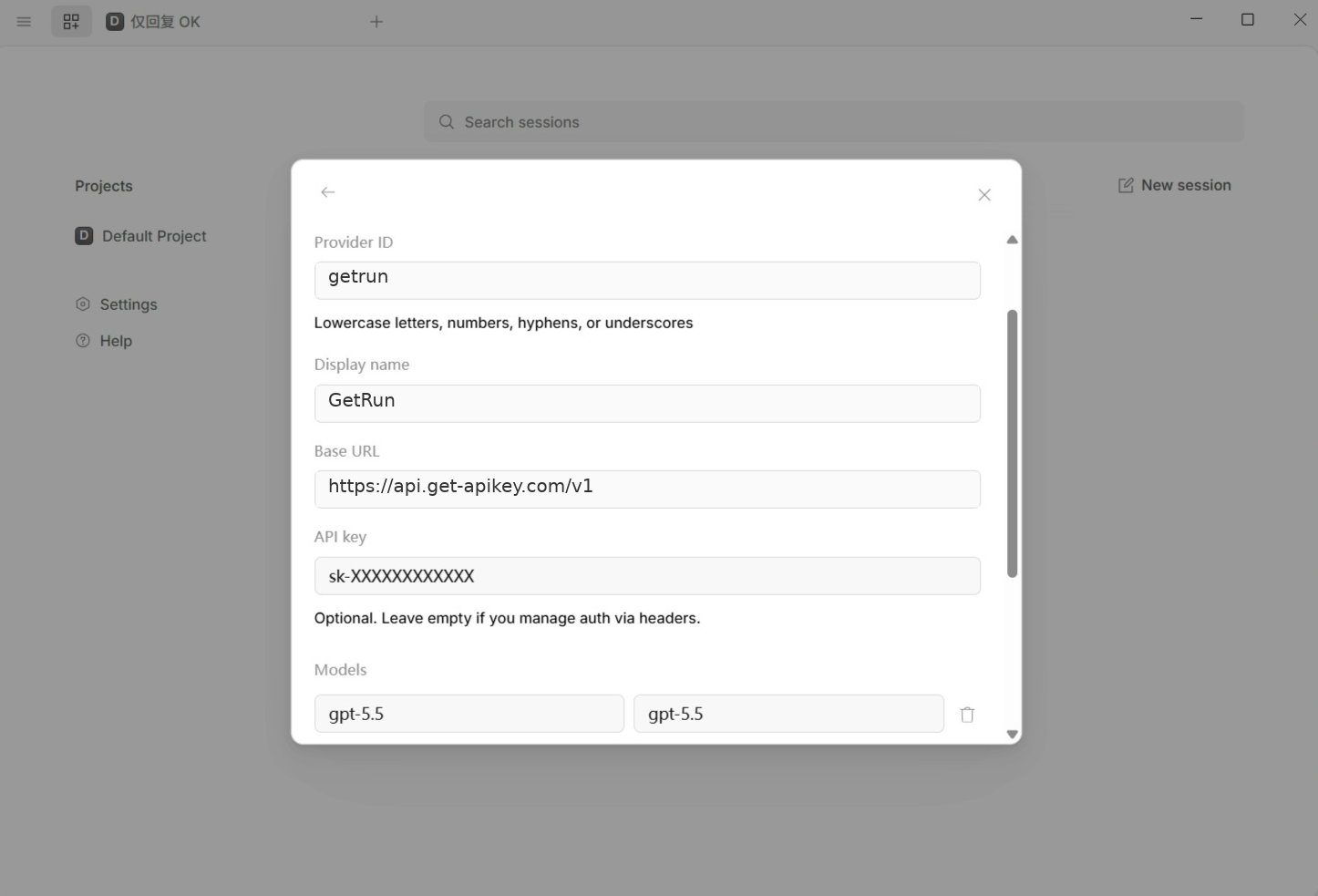
Open OpenCode Desktop and go to Settings → Providers → Add provider → Custom provider, then enter:
- Provider ID:
getrun - Display name:
GetRun - Base URL:
https://api.get-apikey.com/v1 - API key: your actual Key
- Models: enter the actual model ID on the left and its display name on the right; both values may be the same
Scroll down and save. Add more model rows when you need more than one model.
3. Use
Save and reopen OpenCode. Select a project folder, start a session, choose your model under GetRun, and send Reply only OK. After receiving a reply, enter your task.
macOS
1. Install
Download the package for your Mac from OpenCode, follow its installation steps to add it to Applications, and open OpenCode.
2. Configure
Prepare an API Key and copy a model ID from the model catalog that supports Chat Completions and is available to your Key. Replace YOUR_MODEL with that ID.
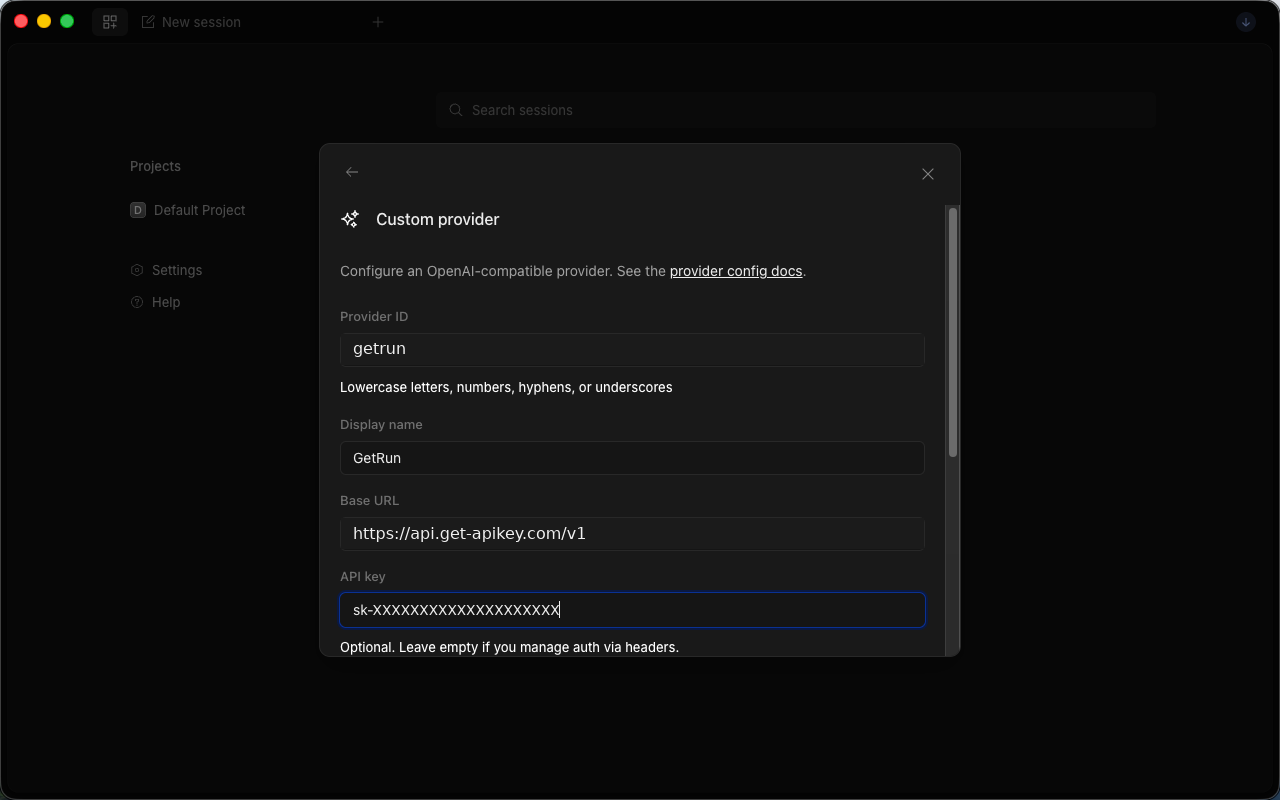
Open OpenCode Desktop and go to Settings → Providers → Add provider → Custom provider, then enter:
- Provider ID:
getrun - Display name:
GetRun - Base URL:
https://api.get-apikey.com/v1 - API key: your actual Key
- Models: enter the actual model ID on the left and its display name on the right; both values may be the same
Scroll down and save. Add more model rows when you need more than one model.
3. Use
Save and reopen OpenCode. Select a project folder, start a session, choose your model under GetRun, and send Reply only OK. After receiving a reply, enter your task.
OpenCode CLI
Windows
1. Install
Open PowerShell from the Start menu.
Check Node.js and npm:
node --version
npm --version
If either command is missing, install the LTS release from Node.js and reopen the terminal. Once both version numbers appear, run:
npm install --global opencode-ai
opencode --version
2. Configure
Prepare an API Key and copy a model ID from the model catalog that supports Chat Completions and is available to your Key. Replace YOUR_MODEL with that ID.
The configuration file is %USERPROFILE%\.config\opencode\opencode.json.
- Press
Win + Eto open File Explorer. - Enter
%USERPROFILE%\.config\opencodein the address bar and press Enter. - Right-click
opencode.jsonand choose Open with → Notepad. - If the directory is missing, create the
.config → opencodefolders inside%USERPROFILE%. If the file is missing, create it in Notepad.
{
  "$schema": "https://opencode.ai/config.json",
  "provider": {
    "getrun": {
      "npm": "@ai-sdk/openai-compatible",
      "name": "GetRun",
      "options": {
        "baseURL": "https://api.get-apikey.com/v1",
        "apiKey": "your-api-key"
      },
      "models": {
        "YOUR_MODEL": {
          "name": "YOUR_MODEL"
        }
      }
    }
  },
  "model": "getrun/YOUR_MODEL"
}
Replace your-api-key with your Key and every YOUR_MODEL with the same model ID. Merge provider.getrun and model into an existing file while keeping other settings.
Save in the directory above. In Notepad, use Save As → All files → UTF-8 and name the file opencode.json without an extra .txt extension.
3. Use
Open your project folder in File Explorer, enter powershell in the address bar, and press Enter.
opencodeSelect your configured GetRun model and send Reply only OK. After receiving a reply, enter your coding task. Restart after editing the configuration.
macOS
1. Install
Press Command + Space to find and open Terminal.
Check Node.js and npm:
node --version
npm --version
If either command is missing, install the LTS release from Node.js and reopen the terminal. Once both version numbers appear, run:
npm install --global opencode-ai
opencode --version
2. Configure
Prepare an API Key and copy a model ID from the model catalog that supports Chat Completions and is available to your Key. Replace YOUR_MODEL with that ID.
The configuration file is ~/.config/opencode/opencode.json.
- Open Finder and press
Command + Shift + G. - Enter
~/.config/opencodeand select Go. - Open
opencode.jsonin TextEdit or VS Code. - If the folder or file is missing, choose File → Open Folder in VS Code, press
Command + Shift + G, and enter~to open your home directory. Create the.config → opencodefolders in the Explorer sidebar, then createopencode.jsoninside.
{
  "$schema": "https://opencode.ai/config.json",
  "provider": {
    "getrun": {
      "npm": "@ai-sdk/openai-compatible",
      "name": "GetRun",
      "options": {
        "baseURL": "https://api.get-apikey.com/v1",
        "apiKey": "your-api-key"
      },
      "models": {
        "YOUR_MODEL": {
          "name": "YOUR_MODEL"
        }
      }
    }
  },
  "model": "getrun/YOUR_MODEL"
}
Replace your-api-key with your Key and every YOUR_MODEL with the same model ID. Merge provider.getrun and model into an existing file while keeping other settings.
Press Command + S to save. In TextEdit, choose Format → Make Plain Text and keep the filename opencode.json.
3. Use
Open Terminal, type cd with a trailing space, drag your project folder from Finder into Terminal, and press Enter.
opencodeSelect your configured GetRun model and send Reply only OK. After receiving a reply, enter your coding task. Restart after editing the configuration.
OpenCode Web
Windows
1. Install
The Web interface runs through OpenCode CLI. Install the CLI first:
Open PowerShell from the Start menu.
Check Node.js and npm:
node --version
npm --version
If either command is missing, install the LTS release from Node.js and reopen the terminal. Once both version numbers appear, run:
npm install --global opencode-ai
opencode --version
2. Configure
Prepare an API Key and copy a model ID from the model catalog that supports Chat Completions and is available to your Key. Replace YOUR_MODEL with that ID.
The configuration file is %USERPROFILE%\.config\opencode\opencode.json.
- Press
Win + Eto open File Explorer. - Enter
%USERPROFILE%\.config\opencodein the address bar and press Enter. - Right-click
opencode.jsonand choose Open with → Notepad. - If the directory is missing, create the
.config → opencodefolders inside%USERPROFILE%. If the file is missing, create it in Notepad.
{
  "$schema": "https://opencode.ai/config.json",
  "provider": {
    "getrun": {
      "npm": "@ai-sdk/openai-compatible",
      "name": "GetRun",
      "options": {
        "baseURL": "https://api.get-apikey.com/v1",
        "apiKey": "your-api-key"
      },
      "models": {
        "YOUR_MODEL": {
          "name": "YOUR_MODEL"
        }
      }
    }
  },
  "model": "getrun/YOUR_MODEL"
}
Replace your-api-key with your Key and every YOUR_MODEL with the same model ID. Merge provider.getrun and model into an existing file while keeping other settings.
Save in the directory above. In Notepad, use Save As → All files → UTF-8 and name the file opencode.json without an extra .txt extension.
3. Use
Open your project folder in File Explorer, enter powershell in the address bar, and press Enter.
opencode webOpen the local URL printed in the terminal, select your project, and start a session. Keep the terminal running; press Ctrl + C there to stop the Web service.
Select your configured GetRun model and send Reply only OK. After receiving a reply, enter your coding task. Restart after editing the configuration.
macOS
1. Install
The Web interface runs through OpenCode CLI. Install the CLI first:
Press Command + Space to find and open Terminal.
Check Node.js and npm:
node --version
npm --version
If either command is missing, install the LTS release from Node.js and reopen the terminal. Once both version numbers appear, run:
npm install --global opencode-ai
opencode --version
2. Configure
Prepare an API Key and copy a model ID from the model catalog that supports Chat Completions and is available to your Key. Replace YOUR_MODEL with that ID.
The configuration file is ~/.config/opencode/opencode.json.
- Open Finder and press
Command + Shift + G. - Enter
~/.config/opencodeand select Go. - Open
opencode.jsonin TextEdit or VS Code. - If the folder or file is missing, choose File → Open Folder in VS Code, press
Command + Shift + G, and enter~to open your home directory. Create the.config → opencodefolders in the Explorer sidebar, then createopencode.jsoninside.
{
  "$schema": "https://opencode.ai/config.json",
  "provider": {
    "getrun": {
      "npm": "@ai-sdk/openai-compatible",
      "name": "GetRun",
      "options": {
        "baseURL": "https://api.get-apikey.com/v1",
        "apiKey": "your-api-key"
      },
      "models": {
        "YOUR_MODEL": {
          "name": "YOUR_MODEL"
        }
      }
    }
  },
  "model": "getrun/YOUR_MODEL"
}
Replace your-api-key with your Key and every YOUR_MODEL with the same model ID. Merge provider.getrun and model into an existing file while keeping other settings.
Press Command + S to save. In TextEdit, choose Format → Make Plain Text and keep the filename opencode.json.
3. Use
Open Terminal, type cd with a trailing space, drag your project folder from Finder into Terminal, and press Enter.
opencode webOpen the local URL printed in the terminal, select your project, and start a session. Keep the terminal running; press Ctrl + C there to stop the Web service.
Select your configured GetRun model and send Reply only OK. After receiving a reply, enter your coding task. Restart after editing the configuration.
Other configuration locations
On Linux, CLI and Web use the same installation command and default to ~/.config/opencode/opencode.json. If XDG_CONFIG_HOME is set, use opencode/opencode.json inside it. If OPENCODE_CONFIG is set, check that file. A project’s opencode.json can also override global settings. See the OpenCode configuration guide.