


Codex (App / CLI)
Separate guides to installing, manually configuring, and using Codex App and CLI on Windows and macOS.
Follow the Codex App or Codex CLI guide below. Each guide includes installation, configuration, and usage steps for Windows and macOS.
Codex App
Follow the Windows or macOS steps for your system.
Windows
1. Install
download the Windows installer from the Codex website, run it, and open Codex.
2. Configure
Prepare an API Key and check your available models in the model catalog. The example below uses gpt-5.6-sol.
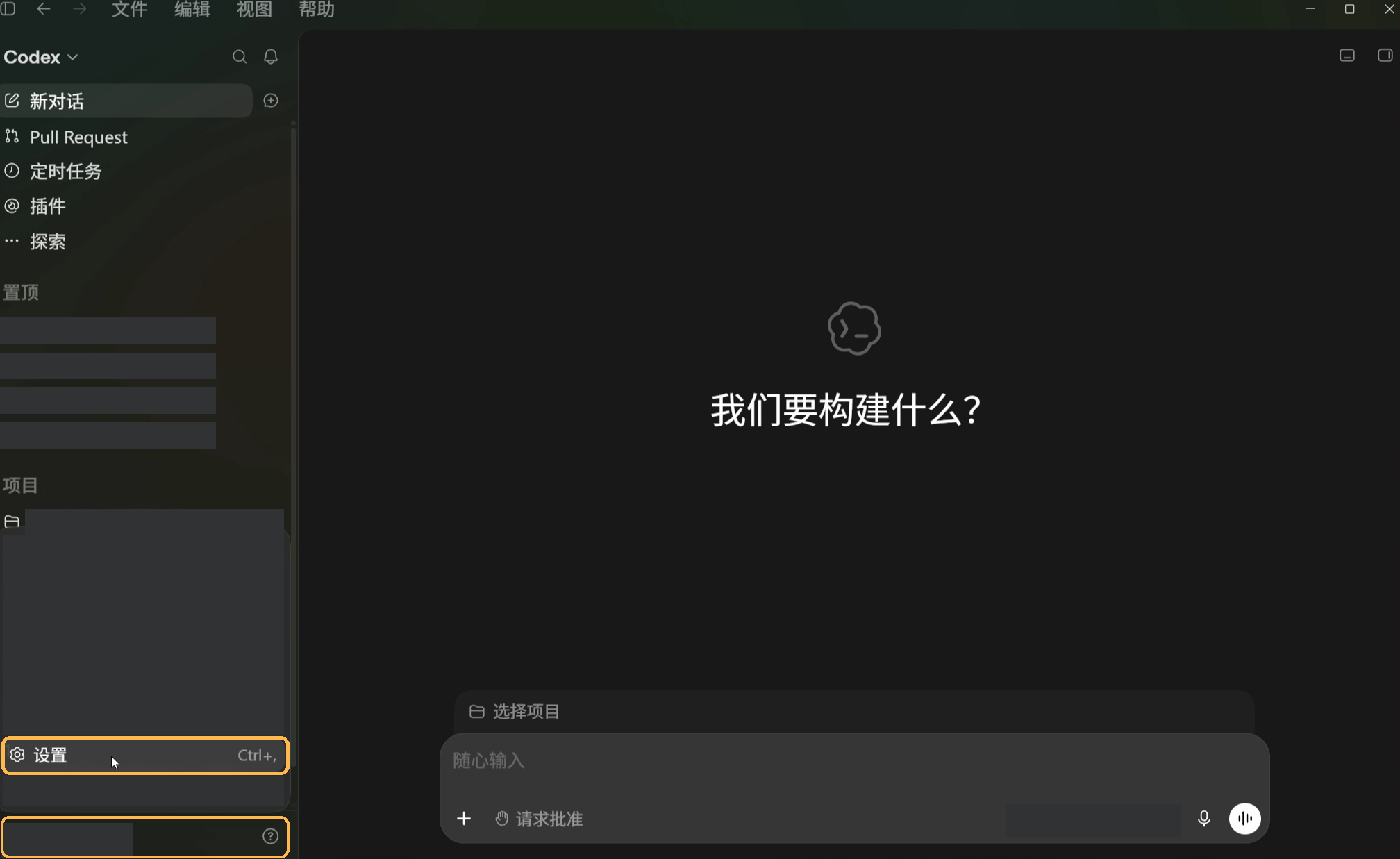
Open the configuration from Codex App:
- Open the account menu in the bottom-left corner and select Settings.
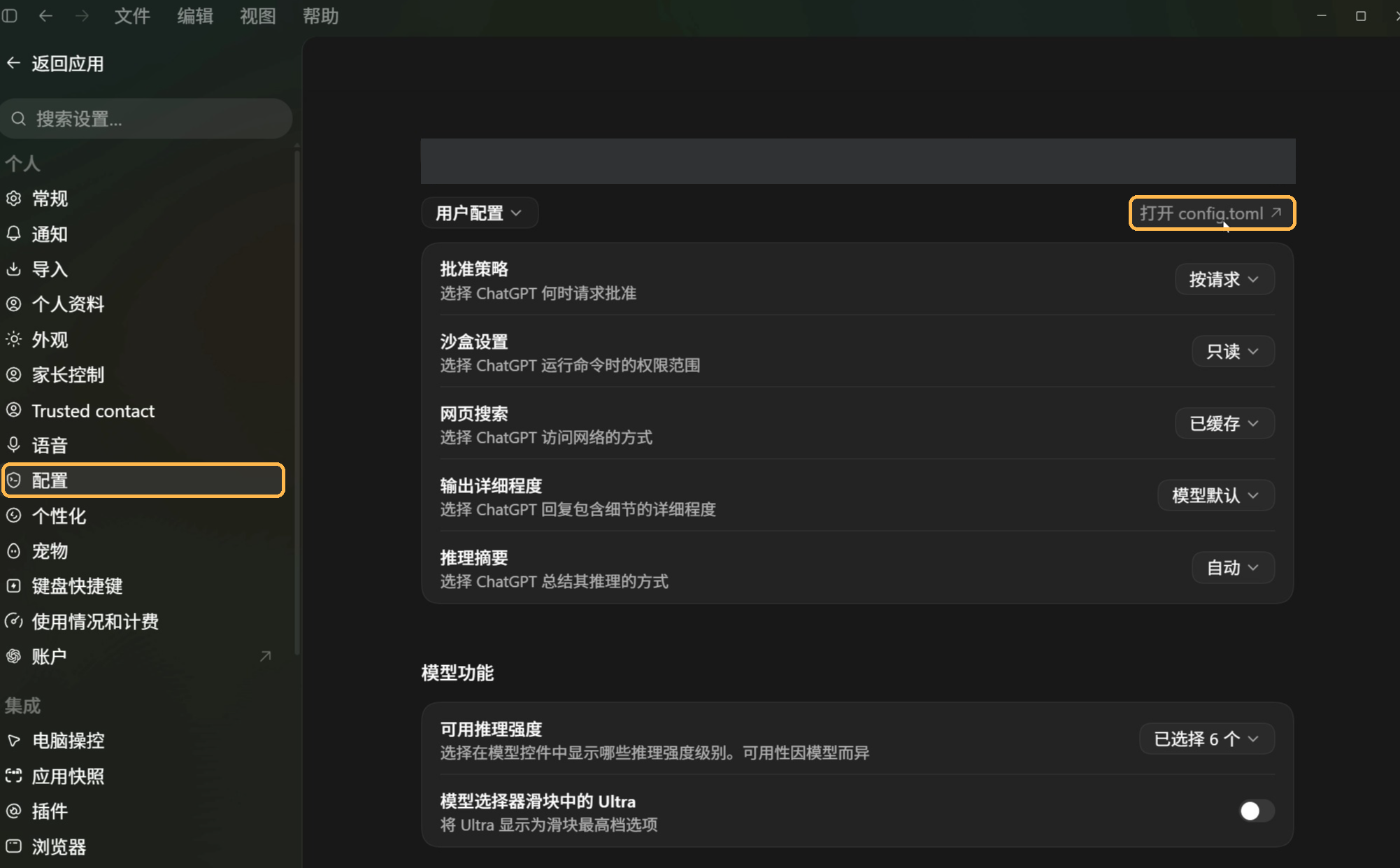
- Select Config in the settings sidebar, then choose the user configuration.
- Click Open config.toml in the top-right corner and open the file in Notepad or VS Code.
Open the file from File Explorer:
The configuration file is %USERPROFILE%\.codex\config.toml.
- Press
Win + Eto open File Explorer. - Enter
%USERPROFILE%\.codexin the address bar and press Enter. - Right-click
config.tomland choose Open with → Notepad. If.codexis missing, create it inside%USERPROFILE%. If the file is missing, create it in Notepad.
Enter the following configuration:
model = "gpt-5.6-sol"
model_reasoning_effort = "high"
model_provider = "get-codex"

[model_providers.get-codex]
name = "Get-Codex"
base_url = "https://api.get-apikey.com/v1"
wire_api = "responses"
requires_openai_auth = true
experimental_bearer_token = "your-api-key"
Replace your-api-key with your API Key and press Ctrl + S. For a new file, use Save As, choose the .codex folder, name the file config.toml, and select All files and UTF-8. Show file extensions in File Explorer and check that the name is not config.toml.txt.
For an existing file, make a backup and update matching fields. Keep the first three lines before any [table], with each field and provider section appearing once. Keep other MCP, project, and permission settings.
3. Use
- Fully quit and reopen Codex.
- Select a project or working directory and start a new session.
- Check the model and send
Reply only OK. Once you receive a reply, enter your task.
macOS
1. Install
download the macOS package from the Codex website, open the DMG, drag Codex to Applications, and open it.
2. Configure
Prepare an API Key and check your available models in the model catalog. The example below uses gpt-5.6-sol.
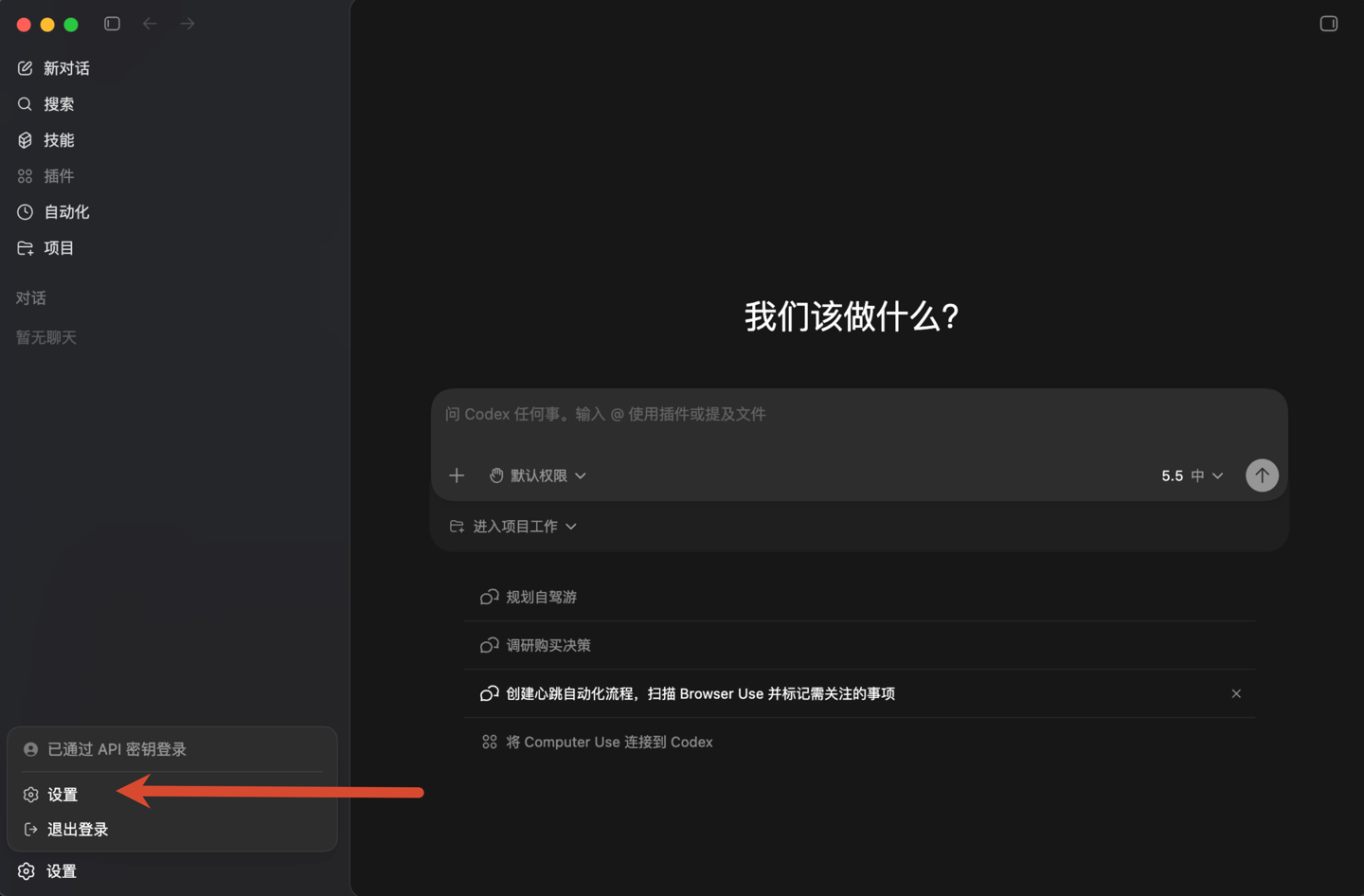
Open the configuration from Codex App:
- Select Settings from the bottom-left menu.
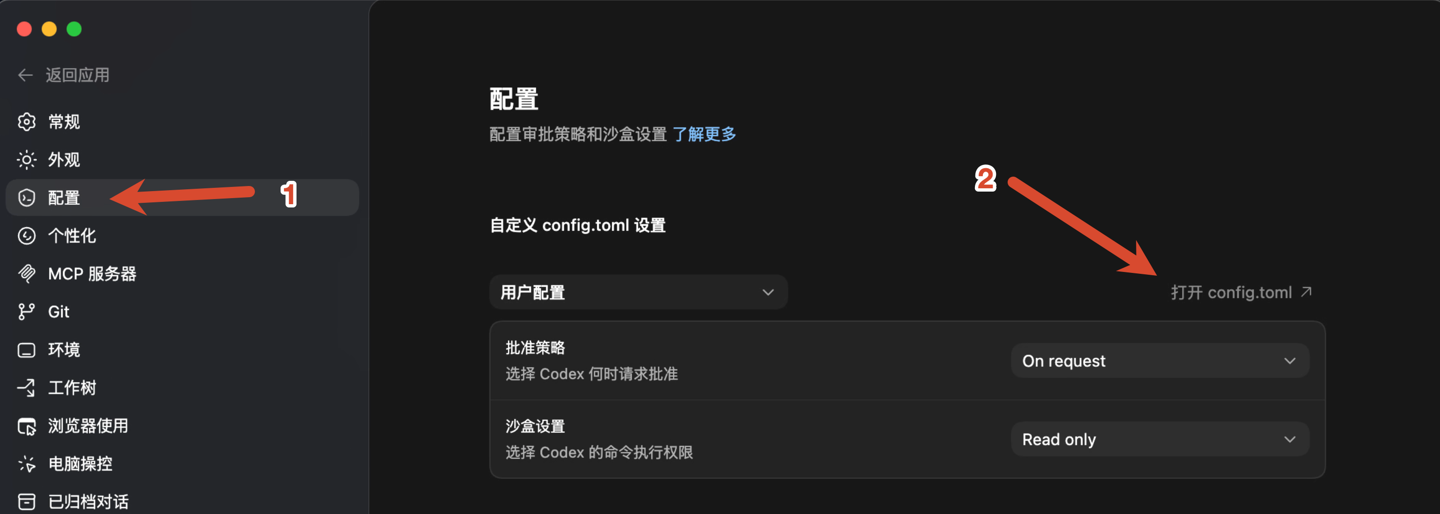
- Open Config and select the user configuration.
- Click Open config.toml and open the file in a text editor or VS Code.
Open the file from Finder:
The configuration file is ~/.codex/config.toml.
- Open Finder and press
Command + Shift + G. - Enter
~/.codexand select Go. - Right-click
config.tomland open it in TextEdit or VS Code. PressCommand + Shift + .to show hidden files if needed. - If the folder or file is missing, open VS Code, choose File → Open Folder, press
Command + Shift + G, and enter~to open your home directory. In the Explorer sidebar, create a.codexfolder and aconfig.tomlfile inside it.
Enter the following configuration:
model = "gpt-5.6-sol"
model_reasoning_effort = "high"
model_provider = "get-codex"

[model_providers.get-codex]
name = "Get-Codex"
base_url = "https://api.get-apikey.com/v1"
wire_api = "responses"
requires_openai_auth = true
experimental_bearer_token = "your-api-key"
Replace your-api-key with your API Key and press Command + S. In TextEdit, choose Format → Make Plain Text and keep the filename config.toml.
For an existing file, make a backup and update matching fields. Keep the first three lines before any [table], with each field and provider section appearing once. Keep other MCP, project, and permission settings.
3. Use
- Fully quit and reopen Codex. Press
Command + Qto quit. - Select a project or working directory and start a new session.
- Check the model and send
Reply only OK. Once you receive a reply, enter your task.
Codex CLI
Follow the Windows or macOS steps for your system.
Windows
1. Install
open PowerShell from the Start menu and check Node.js and npm:
node --version
npm --version
If either command is missing, install the LTS release from Node.js and reopen PowerShell.
Once both version numbers appear, install the CLI:
npm install --global @openai/codex
codex --version
2. Configure
Prepare an API Key and check your available models in the model catalog. The example below uses gpt-5.6-sol.
The configuration file is %USERPROFILE%\.codex\config.toml.
- Press
Win + Eto open File Explorer. - Enter
%USERPROFILE%\.codexin the address bar and press Enter. - Right-click
config.tomland choose Open with → Notepad. If.codexis missing, create it inside%USERPROFILE%. If the file is missing, create it in Notepad.
Enter the following configuration:
model = "gpt-5.6-sol"
model_reasoning_effort = "high"
model_provider = "get-codex"

[model_providers.get-codex]
name = "Get-Codex"
base_url = "https://api.get-apikey.com/v1"
wire_api = "responses"
requires_openai_auth = true
experimental_bearer_token = "your-api-key"
Replace your-api-key with your API Key and press Ctrl + S. For a new file, use Save As, choose the .codex folder, name the file config.toml, and select All files and UTF-8. Show file extensions in File Explorer and check that the name is not config.toml.txt.
For an existing file, make a backup and update matching fields. Keep the first three lines before any [table], with each field and provider section appearing once. Keep other MCP, project, and permission settings.
3. Use
- Open your project folder in File Explorer, type
powershellin the address bar, and press Enter. - Run:
codex- Confirm the project when prompted and send
Reply only OK. Once you receive a reply, enter your coding task.
To continue a session in the same project directory, run:
codex resumemacOS
1. Install
open Terminal and check Node.js and npm:
node --version
npm --version
If either command is missing, install the LTS release from Node.js and reopen Terminal.
Once both version numbers appear, install the CLI:
npm install --global @openai/codex
codex --version
2. Configure
Prepare an API Key and check your available models in the model catalog. The example below uses gpt-5.6-sol.
The configuration file is ~/.codex/config.toml.
- Open Finder and press
Command + Shift + G. - Enter
~/.codexand select Go. - Right-click
config.tomland open it in TextEdit or VS Code. PressCommand + Shift + .to show hidden files if needed. - If the folder or file is missing, open VS Code, choose File → Open Folder, press
Command + Shift + G, and enter~to open your home directory. In the Explorer sidebar, create a.codexfolder and aconfig.tomlfile inside it.
Enter the following configuration:
model = "gpt-5.6-sol"
model_reasoning_effort = "high"
model_provider = "get-codex"

[model_providers.get-codex]
name = "Get-Codex"
base_url = "https://api.get-apikey.com/v1"
wire_api = "responses"
requires_openai_auth = true
experimental_bearer_token = "your-api-key"
Replace your-api-key with your API Key and press Command + S. In TextEdit, choose Format → Make Plain Text and keep the filename config.toml.
For an existing file, make a backup and update matching fields. Keep the first three lines before any [table], with each field and provider section appearing once. Keep other MCP, project, and permission settings.
3. Use
- Open Terminal, type
cdwith a trailing space, drag your project folder from Finder into the terminal, and press Enter. - Run:
codex- Confirm the project when prompted and send
Reply only OK. Once you receive a reply, enter your coding task.
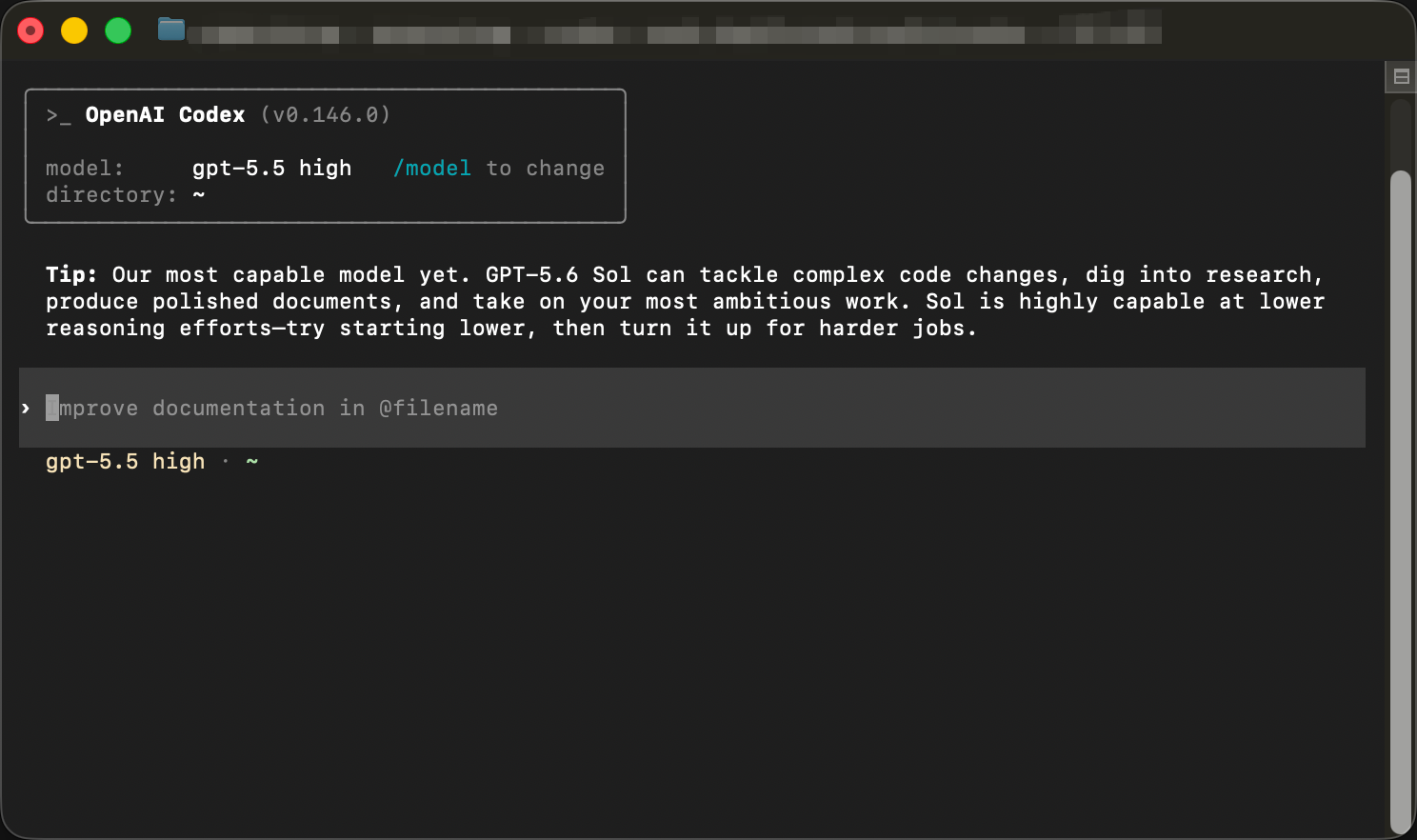
To continue a session in the same project directory, run:
codex resumeLinux CLI uses the same installation and commands; its configuration file is ~/.codex/config.toml.
Configuration fields
Set model_provider to get-codex with the matching [model_providers.get-codex] section. Set name to Get-Codex. The App and CLI share configuration under the same OS user and CODEX_HOME. If CODEX_HOME is set, use config.toml in that directory.
| Field | Meaning |
|---|---|
model | The model to use; this example uses gpt-5.6-sol |
model_reasoning_effort | Reasoning effort; high selects high effort |
model_provider | Connection ID; it must match the section name below |
name | Display name; enter Get-Codex |
base_url | API address, including the final /v1 |
wire_api | Responses API; enter responses |
requires_openai_auth | Authentication compatibility option; enter true |
experimental_bearer_token | Your API Key |
Existing sessions are missing
- Check that the OS user, project folder, and
CODEX_HOMEmatch the environment where the session was created. - In the App, check project filters, search, and archives. In the CLI, return to the session's project and run
codex resume. - If the session is still missing, keep the files in
.codexand contact support with the OS, client version, and a description of the issue.